Tropical lushness meets strategic provocation. This swimsuit refuses to be understated – it asserts its presence with confidence.
The Pink Aloha Summer is a statement in color and form. Large hibiscus blossoms and opulent leaf motifs in powerful pink dominate the surface, while side cut-outs strategically reveal skin and cleverly interrupt the floral patterns. The result: a swimsuit that combines softness and sharpness in one persona.
Highlights:
• Bold tropical print with hibiscus motif in vibrant pink • Strategic side cut-outs for visual contrast and sexiness • Premium material with high wearing comfort and chlorine resistance • Tailored cut with defined edges and structure
Fit:
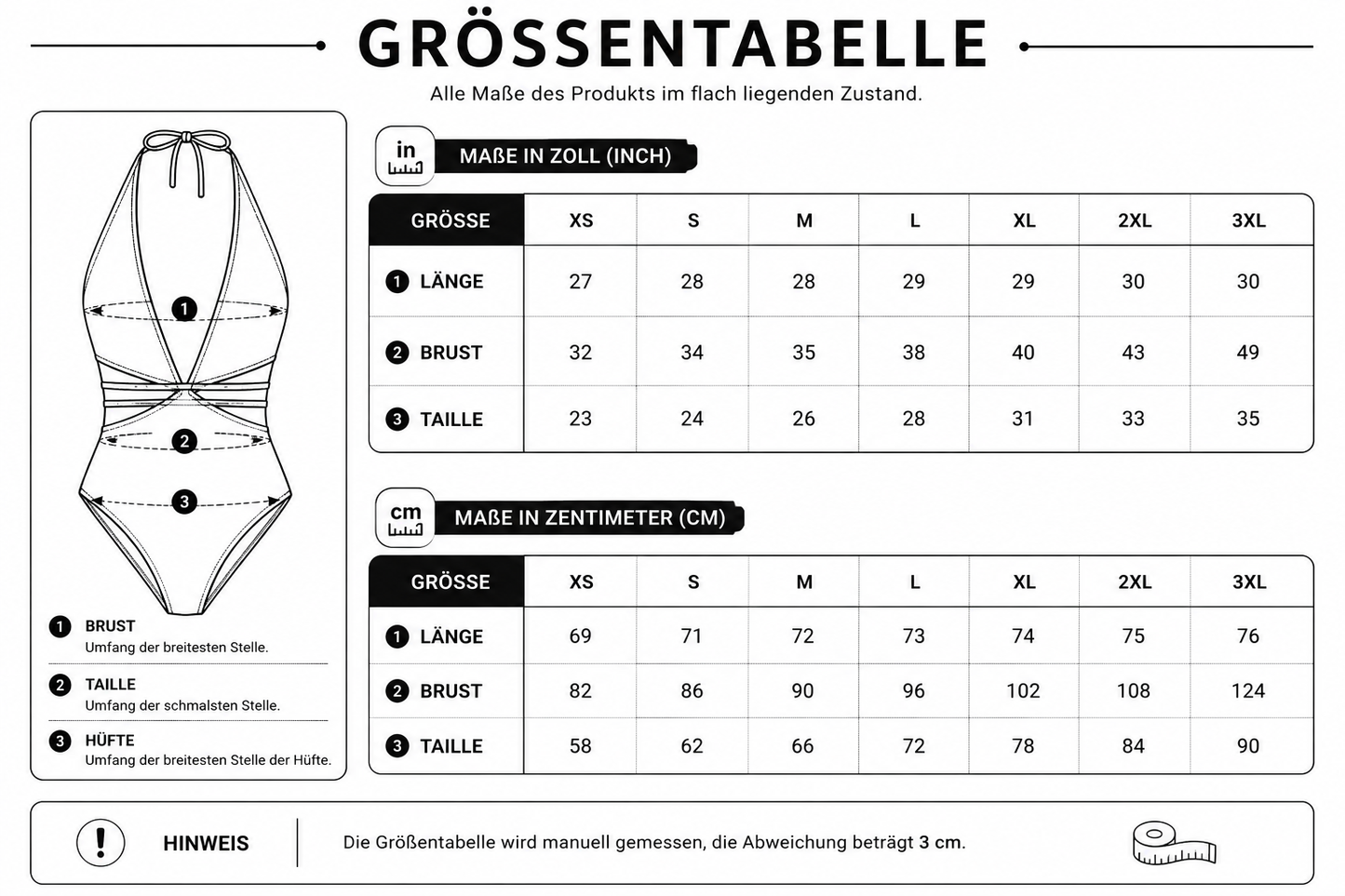
Fits precisely on the body without constricting – developed for confident wearers.
Material
88% polyester and 12% spandex
Hinweis zum Widerrufsrecht:
Bei Print-on-Demand-Artikeln kann das Widerrufsrecht gemäß den gesetzlichen Bestimmungen eingeschränkt sein.
Die genauen Bedingungen findest du in unserer Widerrufsbelehrung.
Deine gesetzlichen Mängelrechte bleiben hiervon selbstverständlich unberührt.
View full details
Sind die Produkte limitiert oder ständig verfügbar?
Viele Designs sind streng limitiert oder Unikate – wenn ein Teil ausverkauft ist, kommt es oft nicht wieder. Schnell sein lohnt sich also! Neue Highlights findest du regelmäßig in unseren Drops.
Was macht PIA BOLTE® Fashion so besonders?
Jedes Teil ist ein Statement – entworfen in Deutschland im Herzen von München, inspiriert vom internationalen Streetstyle. Wir setzen auf auffällige Designs, starke Silhouetten und hochwertige Materialien, damit du dich jeden Tag wie auf den Laufstegen dieser Welt fühlst.
Wie lange dauert der Versand innerhalb Deutschlands?
Deine Bestellung wird in der Regel innerhalb von 2–5 Werktagen geliefert. Sobald dein Paket unterwegs ist, erhältst du eine Sendungsverfolgung per E-Mail.
Choosing a selection results in a full page refresh.
Opens in a new window.
PayPal Pay Later Messaging
Step 1: Choose message placement
Click the button below and then hover over your page to select a placement.
Step 2: Paste and save
You have copied the placement for the Product Page.
Go back to the App Embeds section, and in the Paypal Advanced Settings, paste the copied value into the
Product Page field and click the 'Save' button in the top right corner.